First, confirm the domain can still resolve
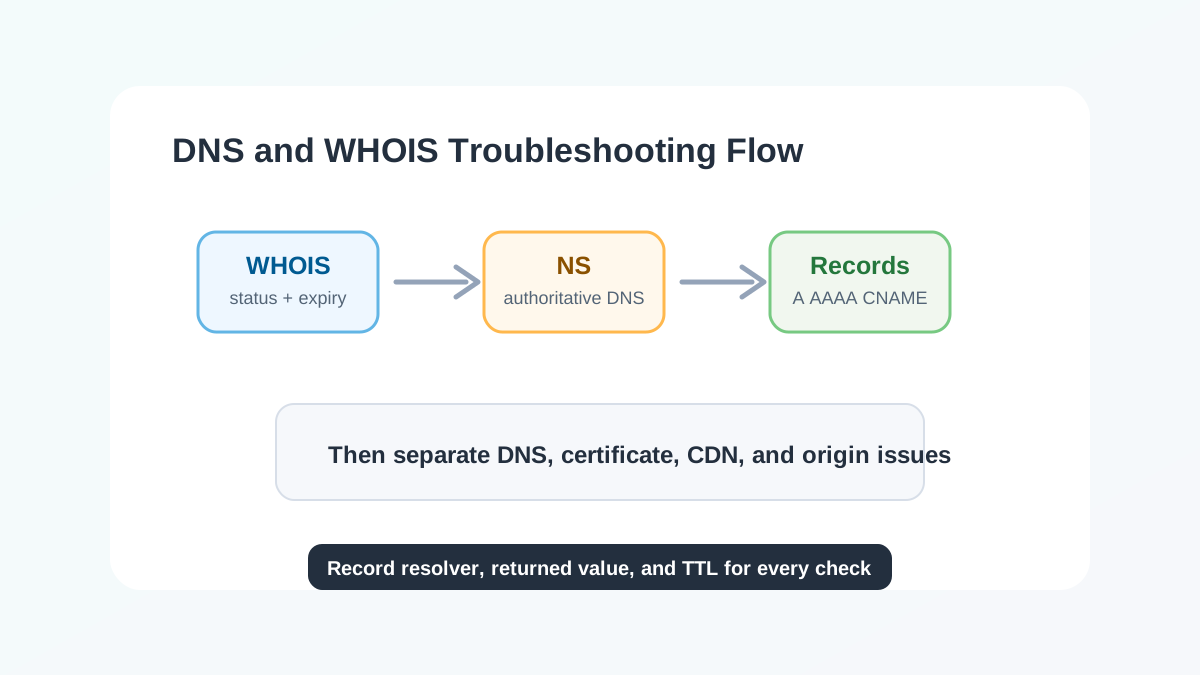
When access fails, start with WHOIS or RDAP to review expiration, registrar, domain status, and NS records. Expired, clientHold, serverHold, or pendingDelete statuses can interrupt resolution or make it unpredictable.
If the domain was recently transferred or NS records changed, confirm that registrar-side and DNS-hosting-side settings match. Many incidents are not caused by a wrong record value, but by queries still reaching the old authoritative DNS.
Second, verify record type and TTL
For website access, check A, AAAA, or CNAME records first. For email, focus on MX, TXT, SPF, DKIM, and DMARC. Avoid mixing record types incorrectly. For example, root-domain CNAME support depends on the DNS provider.
TTL controls cache lifetime. After a record change, recursive resolvers and clients may still return old values. Record query time, resolver, returned value, and TTL during troubleshooting so cache delay is not mistaken for configuration failure.
Third, separate DNS, certificate, and origin issues
Healthy DNS does not guarantee the site is reachable. After the domain resolves to the right IP, check origin ports, load balancer health checks, certificate name matching, HTTPS redirects, and CDN origin configuration.
6MCloud Tool Center currently provides WHOIS and DNS lookup for domain and resolution checks. SSL, Ping, port checks, and multi-region probing can be added next.
Takeaways
- Confirm the domain is not expired, status is normal, and NS is correct.
- Verify values and TTL by record type.
- After DNS is healthy, continue checking certificates, ports, origin, and CDN.